Table of Contents
- Introduction to EMB Format
- Why Convert to EMB Format?
- Understanding Wilcom Software
- Preparing Your Design Files
- How to Convert to EMB Format Step-by-Step
- Best Tools for Conversion
- Professional Tips for High-Quality EMB Files
- Common Mistakes to Avoid
- Get Expert Help with EMB Conversion
- Conclusion
Introduction to EMB Format
The EMB format is a specialized embroidery file type used in Wilcom software. It contains detailed information such as stitch density, color sequencing, and machine commands. Learning how to Convert to EMB Format ensures that your design runs flawlessly on modern embroidery machines.
Why Convert to EMB Format?
When you Convert to EMB Format, your design becomes fully compatible with embroidery machines, ensuring smooth stitching, correct thread color usage, and efficient machine operations. Image formats like PNG or JPG lack the precision that EMB provides, making conversion essential for professional embroidery production.
Understanding Wilcom Software
Wilcom is one of the most trusted embroidery digitizing software programs in the world. It allows users to create, edit, and simulate embroidery designs. When you Convert to EMB Format using Wilcom, you gain access to superior control over stitches, textures, and layering, leading to professional-quality embroidery results.
Preparing Your Design Files
Before starting the conversion, ensure your artwork is clean, high-resolution, and properly aligned. Accepted input formats include PNG, AI, EPS, and JPG. Simplify gradients and avoid unnecessary details that can cause overlapping stitches when you Convert to EMB Format.
How to Convert to EMB Format Step-by-Step
Step 1: Open Your File in Wilcom
Launch Wilcom Embroidery Studio and import your artwork. The program automatically recognizes multiple file types, allowing easy digitizing from raster or vector formats.
Step 2: Digitize the Artwork
Use Wilcom’s digitizing tools to define paths, stitch types, and outlines. This step is crucial to ensure the design maintains integrity once you Convert to EMB Format.
Step 3: Adjust Stitch Parameters
Fine-tune your design’s stitch density, underlay, and pull compensation based on fabric type. Proper adjustments prevent distortion and thread breakage during embroidery.
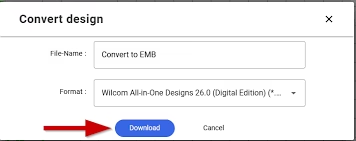
Step 4: Save as EMB File
After final adjustments, go to File → Save As and select the EMB format. Your file is now ready for machine production and editing in Wilcom.
Best Tools for Conversion
While Wilcom is the industry leader, tools like Hatch Embroidery and Pulse are also capable. However, Wilcom provides the most precise stitch control when you Convert to EMB Format. If you prefer expert help, consider Quality Digitizing, a professional service that ensures perfect stitch execution and machine compatibility.
Professional Tips for High-Quality EMB Files
- Use vector files (AI or EPS) for clean outlines.
- Match thread colors accurately to your fabric type.
- Always test-stitch your file before bulk production.
- Save backup copies after every major change.
Following these tips helps you create flawless embroidery results when you Convert to EMB Format.
Common Mistakes to Avoid
Errors such as missing underlay, incorrect scaling, and thread breaks are common if digitizing is rushed. Always verify every layer before saving to EMB. Remember that raster images can’t be directly used without proper digitization.
Get Expert Help with EMB Conversion
If you’re unsure how to Convert to EMB Format accurately, reach out to professionals at Quality Digitizing. Their experts deliver optimized stitch files ready for machine production, ensuring perfect quality every time.
Conclusion
Mastering how to Convert to EMB Format is essential for anyone working in embroidery design. With the right preparation, tools, and expert guidance, you can achieve outstanding embroidery results. For reliable, professional digitizing services, visit Quality Digitizing — or explore official resources from Wilcom to learn more about embroidery software and digitizing best practices.