Table of Contents
- Introduction: Sketch to Digitized Logo Conversion
- Why Convert Photos of Sketches into Digitized Logos?
- Step 1 — Photographing and Preparing Your Sketch
- Step 2 — Cleaning and Refining the Image
- Step 3 — Converting to Vector (Digitizing)
- Step 4 — Exporting in the Right File Formats
- Pro Tips for Best Results
- Common Mistakes to Avoid
- When to Hire a Professional
- Get Expert Help from Quality Digitizing
- Conclusion
Introduction: Sketch to Digitized Logo Conversion
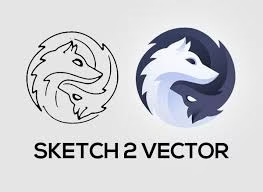
Sketch to Digitized Logo conversion is an essential part of transforming creative ideas into professional, scalable designs. The process takes a hand-drawn sketch or artwork and turns it into a digital file that can be used across multiple platforms — from printing to embroidery.
For best results, it’s smart to rely on skilled professionals like Quality Digitizing who specialize in vector artwork and embroidery-ready designs. This ensures your artwork is sharp, scalable, and ready for production.
If you want to understand what digitization means in design, check out this helpful overview of vector graphics to learn how digital paths replace pixel-based images for professional use.
Why Convert Photos of Sketches into Digitized Logos?
Digitizing a hand-drawn sketch offers more than just digital preservation — it provides a gateway to professional branding. Here are the top reasons to convert your sketch into a digitized logo:
- Scalability: Vector logos can be resized without losing quality.
- Versatility: Use your logo across digital and print platforms.
- Professional Look: Clean, sharp lines make your artwork production-ready.
- Easy Editing: Adjust shapes, colors, and proportions anytime.
Step 1 — Photographing and Preparing Your Sketch
Begin by photographing your sketch in good lighting conditions. Natural daylight or soft diffused light prevents shadows and helps capture accurate details. Make sure your paper lies flat and your camera is level for the best results.
Step 2 — Cleaning and Refining the Image
Before you start digitizing, edit your image to remove smudges and adjust contrast. Using tools like Photoshop or GIMP, enhance line sharpness and clean the background. Converting the image to black and white also helps make the outlines clearer and easier to trace.
Step 3 — Converting to Vector (Digitizing)
This is the heart of the Sketch to Digitized Logo process. Using software like Adobe Illustrator or CorelDRAW, manually trace your sketch with the Pen Tool. This technique ensures smooth, accurate lines that preserve your original concept while making the design fully scalable.
If you’d prefer expert handling, Quality Digitizing provides manual vector tracing and embroidery file creation services, ensuring perfect line quality and color accuracy.
Step 4 — Exporting in the Right File Formats
Once your logo is vectorized, save it in formats suitable for both digital and print use:
- SVG: Ideal for websites and scalable graphics.
- AI / EPS: Best for professional print and embroidery purposes.
- PDF: Easy to share with clients or vendors while retaining vector quality.
- PNG: Perfect for online use with transparent backgrounds.
Pro Tips for Best Results
- Keep your vector file clean — avoid unnecessary points or overlapping paths.
- Save multiple versions for different uses (color, black & white, transparent).
- Check visibility at small sizes to ensure clarity.
- Document brand color codes (Pantone, CMYK, RGB) for consistency.
Common Mistakes to Avoid
- Using low-resolution photos that lose detail during tracing.
- Adding excessive detail that won’t embroider cleanly.
- Ignoring file format requirements for print vs. embroidery.
- Skipping professional review before finalizing your design.
When to Hire a Professional
For logos that need to look perfect across embroidery, screen printing, and online platforms, professional digitizing is the best route. At Quality Digitizing, experts manually convert your sketch into high-quality vector and embroidery formats with fast turnaround and guaranteed precision.
Get Expert Help from Quality Digitizing
Ready to convert your artwork into a production-ready format? Visit Quality Digitizing today and upload your sketch. Our professional team ensures your design is polished, scalable, and ready for embroidery, printing, or branding. Join thousands of satisfied customers who trust our expertise to bring their sketches to life.
Conclusion
Converting photos of sketches into digitized logos bridges creativity and professionalism. By combining manual precision with digital accuracy, your hand-drawn designs can become timeless brand assets. Learn more about digitizing and vectorization on educational platforms like Wikipedia’s embroidery article and partner with Quality Digitizing to get expert help today.