Table of Contents
- Introduction
- What is Vector Conversion?
- Raster vs Vector: The Key Differences
- How Vector Conversion Improves Print Quality
- Common Mistakes to Avoid During Conversion
- How to Prepare Artwork for Vector Conversion
- When to Use Professional Vector Conversion
- Conclusion
Introduction
High-quality printing starts long before the presses run — it starts with the artwork. Converting images to vector format is one of the most effective ways to guarantee crisp, consistent print output across sizes and substrates. Whether you’re producing apparel, packaging, signage, or promotional items, proper vector conversion eliminates pixelation, preserves brand integrity, and makes production far more predictable. This article explains what vector conversion is, why it matters for print quality, and how to get the best results.
What is Vector Conversion?
Vector conversion is the process of transforming raster artwork (images made of pixels) into vector artwork (mathematical paths and shapes). Raster formats such as JPG or PNG are resolution-dependent — when enlarged, they lose clarity. Vector formats — like AI, EPS, SVG, and PDF — use coordinates and curves so images remain perfectly sharp at any size. Vector conversion recreates the artwork as editable shapes, enabling precise control over lines, fills, and typography for printing. To learn more about vector graphics, visit this external resource.
Raster vs Vector: The Key Differences
Understanding the difference between raster and vector files clarifies why vector conversion improves print quality:
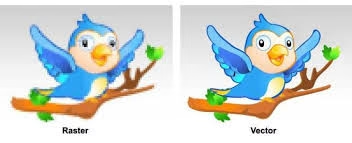
- Raster images are pixel-based. They can show excellent detail at the native resolution but will degrade when scaled up.
- Vector images are path-based. They scale infinitely, keep edges razor-sharp, and are easy to edit for different print needs.
For logos, icons, and any design that needs to appear across multiple sizes and materials, vector artwork is the professional standard.
How Vector Conversion Improves Print Quality
Scalability without Loss
One of the most powerful benefits of vector conversion is scalability. A single vector file can be used for small labels and huge banners without reworking the artwork. Because vectors are mathematical descriptions rather than pixels, there is no quality loss when enlarging the design. This avoids the common issue of blurry or jagged edges that occur when raster images are scaled up for large-format printing.
Crisp Edges and Smooth Curves
Vectors produce smooth curves and precise edges because anchor points and Bézier curves define shapes. Thin strokes, hairline details, and small typography remain legible and clean when converted properly. This precision is especially important for screen printing, vinyl cutting, and embroidered transfers where edges and outlines must be accurate.
Reliable Color Handling
Vector files make color management simpler and more reliable. When artwork is vectorized, colors can be set to exact values (CMYK or spot colors like Pantone), which helps printers reproduce brand colors consistently. This reduces unexpected shifts during separation and printing, ensuring your printed materials match the intended color palette.
Cleaner File Prep for Printers
Printers and prepress technicians prefer vector artwork because it integrates smoothly into production workflows. Vector files typically require fewer corrections in prepress, simplifying tasks like trapping, outlining fonts, and separating colors. This leads to fewer surprises at proof stage and fewer delays on the production floor.
Improved Production Efficiency
Using vector assets speeds up production and reduces waste. Vector artwork is easier to prepare for different print methods (screen, digital, large format, direct-to-garment) and allows the same master file to be adapted quickly. That efficiency translates to faster turnarounds, more predictable costs, and higher-quality finished products.
Common Mistakes to Avoid During Conversion
Vector conversion is powerful, but errors in the process can reduce print quality. Watch for these common pitfalls:
- Auto-tracing without cleanup: Relying solely on auto-trace tools often creates excess anchor points and rough paths that must be manually refined.
- Ignoring stroke widths: Thin strokes in vector may print inconsistently if not adjusted for the chosen method.
- Leaving fonts unoutlined: Not converting fonts to outlines can cause font mismatches if the printer lacks the same typeface.
- Using RGB color mode: Preparing files in RGB instead of CMYK or specified spot colors can lead to inaccurate print colors.
- Overcomplicating shapes: Too many tiny details can complicate certain print processes; simplify where appropriate.
How to Prepare Artwork for Vector Conversion
Proper preparation speeds up conversion and yields better results. Follow these steps before sending artwork for vector conversion:
- Provide the highest-resolution source available; if possible, include the original layered file (AI, PSD, or PDF).
- Supply brand color codes (CMYK or Pantone values) and any preferred fonts or font files.
- Indicate intended print sizes and substrates — printing on fabric, metal, or paper may require different adjustments.
- Communicate whether the artwork must be simplified for embroidery, screen printing, vinyl cutting, or full-color digital print.
Clear instructions and good source files make vector conversion faster, cheaper, and more accurate.
When to Use Professional Vector Conversion
Automated vector converters can help with simple graphics, but complex logos and brand-critical assets require a professional touch. Skilled vector artists manually recreate artwork, optimize anchor points, correct curves, outline fonts, and set up proper color separations. For consistent, production-ready files — especially when multiple print methods or large formats are involved — using professionals is the safe choice. If you need reliable vector conversion and print-ready files, consider working with experienced providers who specialize in preparing artwork for commercial printing and embroidery. A professional service will ensure your files are optimized for the specific printing process you plan to use while preserving brand fidelity.
When you rely on experts, you avoid costly reprints, color mismatches, and layout problems that often occur with poorly prepared artwork. For professional assistance, get expert vector conversion services here.
Conclusion
Vector conversion is a fundamental step toward achieving excellent print quality. It guarantees scalability, clean edges, predictable colors, and more efficient production workflows. By preparing artwork correctly and choosing professional vector conversion when needed, businesses can safeguard their brand image across every printed medium. For consistent, high-quality results across apparel, signage, packaging, and promotional products, always start with properly vectorized artwork.
Tags: vector conversion, print quality, artwork preparation, vector graphics, professional design