Table of Contents
- Introduction to Converting Scanned Logos to Vector
- What Does It Mean to Convert Scanned Logo to Vector?
- Why Convert Scanned Logos into Vector Format?
- Preparing Your Scanned Logo for Conversion
- Step-by-Step Process to Convert Scanned Logo to Vector
- Best Software for Logo Vectorization
- Common Mistakes to Avoid
- Benefits of Professional Vector Conversion Services
- How Quality Digitizing Can Help
- Conclusion and Call to Action
Introduction to Converting Scanned Logos to Vector
Convert Scanned Logo to Vector is one of the most efficient ways to restore and modernize old or low-quality logos. Many businesses have only scanned versions of their logos that are blurry, faded, or pixelated. By converting these into clean vector files, you can achieve high-quality, scalable results ideal for printing, embroidery, and digital branding. With professional services like Quality Digitizing, you can easily transform old designs into sharp, production-ready vector artwork.
What Does It Mean to Convert Scanned Logo to Vector?
When you convert scanned logo to vector, you are transforming a raster-based image into a vector-based graphic composed of points, lines, and curves. Raster images such as JPEGs and PNGs are made of pixels and lose clarity when enlarged, whereas vector graphics maintain perfect quality at any size. The process involves redrawing or tracing the scanned logo to create smooth, editable paths that replicate the original artwork accurately.
To learn more about how vector graphics work, you can visit Adobe’s Vector Graphics Guide, which explains the core principles of scalable design and vector file structures.
Why Convert Scanned Logos into Vector Format?
Converting scanned logos into vector format ensures your brand’s visual identity remains sharp and professional across all applications. Whether you need to print large banners, create digital graphics, or produce embroidered merchandise, vector files deliver unmatched quality. They are fully scalable, editable, and color-consistent.
By choosing Quality Digitizing, you can have your scanned logo manually converted into vector format, preserving every detail and ensuring compatibility with print and embroidery equipment.
Preparing Your Scanned Logo for Conversion
Before you begin the Convert Scanned Logo to Vector process, it’s essential to prepare your file correctly. This helps achieve more accurate tracing and reduces cleanup time later. Follow these simple steps:
- Scan your logo in at least 300 DPI resolution.
- Ensure the logo is well-lit, flat, and free of shadows or creases.
- Clean up the background to make outlines clearer.
- Save your scan as a PNG or TIFF for optimal quality.
Proper preparation ensures your vector file retains sharpness and true colors once converted.
Step-by-Step Process to Convert Scanned Logo to Vector
Step 1: Import the Scanned Image
Open your scanned logo in vector editing software like Adobe Illustrator, CorelDRAW, or Inkscape. Ensure the resolution is sufficient for accurate tracing.
Step 2: Trace or Redraw the Logo
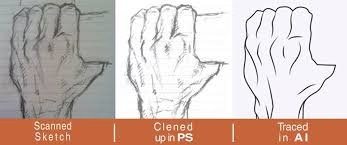
Use the pen tool or the auto-trace feature to outline shapes and text. For complex designs, manual tracing gives the best precision and control.
Step 3: Adjust Paths and Shapes
Refine your traced lines to remove irregularities. Smooth curves and consistent stroke widths make the final design more professional.
Step 4: Recolor and Align
Use brand color codes or eyedropper tools to match your logo’s colors perfectly. Proper color alignment maintains brand consistency.
Step 5: Save and Export
Export your final file in vector formats like AI, EPS, SVG, or PDF. These formats are ideal for both digital and print use.
Best Software for Logo Vectorization
There are many tools available for Convert Scanned Logo to Vector tasks. Some of the most trusted include Adobe Illustrator, CorelDRAW, and Inkscape. Each offers precise tracing and editing capabilities. However, manual conversion by experts at Quality Digitizing ensures clean results without the distortions common in automated conversions.
Common Mistakes to Avoid
When converting a scanned logo to vector, beginners often make mistakes that compromise the final result. Avoid these common errors:
- Starting with a low-resolution scan.
- Using auto-trace without manual cleanup.
- Overlooking alignment and proportional balance.
- Ignoring color accuracy or mismatched shades.
To guarantee professional quality, always review your vector artwork or let professionals handle the conversion for you.
Benefits of Professional Vector Conversion Services
Working with professionals like Quality Digitizing ensures your scanned logos are accurately converted into flawless vector art. Here are the benefits:
- High-resolution, print-ready files for any application.
- Accurate recreation of text, color, and layout.
- Editable files for easy future modifications.
- Fast turnaround and affordable pricing.
With expert services, you can rest assured that your logo’s integrity remains intact across all media.
How Quality Digitizing Can Help
Quality Digitizing offers expert solutions to convert scanned logos into clean, editable, and scalable vector artwork. Their team of skilled designers carefully traces every detail to ensure precision and clarity. Whether you need your logo for digital use, screen printing, or embroidery, their professionals deliver industry-standard results every time.
Conclusion and Call to Action
In conclusion, choosing to Convert Scanned Logo to Vector is a smart move for any brand that values quality and consistency. By transforming old, scanned logos into professional vector formats, you ensure sharpness, scalability, and longevity across all design applications. Don’t let your brand image suffer because of blurry or outdated artwork.
Get started today with Quality Digitizing — your trusted partner for precise and affordable logo vectorization services.