Table of Contents
- Introduction
- What Is JPG to Vector Conversion?
- Why Small Businesses Need Vector Conversion
- How JPG to Vector Conversion Works
- Benefits of Vector Conversion for Businesses
- Why Choose Quality Digitizing
- Applications of Vector Art
- Tips for the Best JPG to Vector Results
- Learn More About Vector Graphics
- Get Started Today
- Conclusion
Introduction
For small businesses, professional-quality branding can make a big difference in attracting customers. One of the most crucial steps in creating sharp, print-ready graphics is JPG to Vector Conversion for Small Businesses. Whether you need a logo, signage, or promotional design, converting your JPG files into vector format ensures perfect clarity at any size.
At Quality Digitizing, we specialize in delivering precise and affordable vector conversions that help small businesses stand out with professional results.
What Is JPG to Vector Conversion?
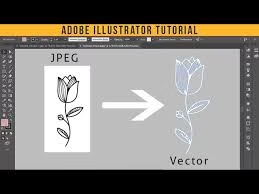
JPG to Vector Conversion is the process of transforming a raster image (made of pixels) into a vector file (made of mathematical paths and points). Unlike JPGs, which lose quality when resized, vector images can be scaled infinitely without becoming blurry or pixelated.
For small businesses, this means you can use the same design for everything—from business cards and banners to uniforms and websites—without worrying about distortion.
Why Small Businesses Need Vector Conversion
Every small business wants a consistent and professional look across all branding materials. That’s why JPG to Vector Conversion for Small Businesses is essential. Here are some reasons why:
- Professional Presentation: Vector art ensures your logo or design looks sharp in every format.
- Cost-Effective Printing: Printers prefer vector files because they produce cleaner results with accurate colors.
- Brand Consistency: Maintain uniform quality across all promotional items and platforms.
- Easy Editing: Make changes to colors, shapes, or layout anytime without losing quality.
How JPG to Vector Conversion Works
At Quality Digitizing, we follow a detailed manual process to ensure each conversion is perfect. Here’s how it works:
Step 1: Upload Your JPG File
You start by uploading your image file in JPG, PNG, or BMP format. The clearer your image, the better your final vector result will be.
Step 2: Manual Tracing by Professionals
Our experienced designers use professional software to hand-trace your image, creating smooth vector lines and paths for precision.
Step 3: Review and Adjustments
Before final delivery, we review the artwork to ensure color accuracy, alignment, and smooth edges.
Step 4: Delivery in Multiple Formats
Once approved, you’ll receive your converted file in formats like AI, EPS, PDF, or SVG—ready for print, embroidery, or digital use.
Benefits of Vector Conversion for Businesses
Small businesses gain multiple advantages by investing in JPG to Vector Conversion for Small Businesses:
- High-resolution artwork for printing and marketing
- Editable design elements for future updates
- Faster production time for merchandise
- Consistent brand appearance across all platforms
- Enhanced visual quality for both digital and print materials
With Quality Digitizing, you receive all these benefits with fast delivery and affordable pricing.
Why Choose Quality Digitizing
Quality Digitizing is trusted by thousands of small businesses for its accurate, fast, and affordable vector conversion services. We pride ourselves on delivering top-tier results that help your business look professional.
Every file is carefully hand-traced by skilled designers—no auto-tracing software—ensuring clean lines and precise detailing. Whether you’re preparing for a print order, an embroidery project, or an online campaign, our team guarantees perfection in every file.
Applications of Vector Art for Small Businesses
Here are just a few ways small businesses can use vector art effectively:
- Company logos and branding
- Product packaging and labels
- Apparel design and embroidery
- Signage, banners, and posters
- Marketing flyers and brochures
- Website graphics and social media visuals
Tips for the Best JPG to Vector Results
- Start with a clear, high-resolution image.
- Limit color complexity for smoother results.
- Specify preferred output formats like AI, EPS, or SVG.
- Review the final file before printing or sharing.
- Choose manual vector conversion for the highest accuracy.
Learn More About Vector Graphics
To understand how vector images differ from raster images and why they are essential for business branding, explore
Adobe’s official guide to vector graphics
. It provides an excellent overview of how scalable vector art can enhance your design workflow.
Get Started with JPG to Vector Conversion Today
Ready to transform your business visuals? Visit
Quality Digitizing today for reliable, professional, and high-quality
JPG to Vector Conversion for Small Businesses. Upload your file, get a free quote, and receive your vector art within 24 hours.
Conclusion
In today’s competitive market, professional visuals are essential for success. JPG to Vector Conversion for Small Businesses ensures your graphics stay sharp, scalable, and ready for every marketing opportunity.
Trust Quality Digitizing for all your vector conversion needs — where precision meets creativity.