Table of Contents
- Introduction to Low-Resolution Image Vector Conversion
- Why Vector Conversion Matters
- How Low-Resolution Images Affect Quality
- The Process of Vector Conversion Explained
- Benefits of Professional Vector Conversion Services
- Common Uses of Vectorized Images
- How to Choose the Right Conversion Service
- Conclusion
Introduction to Low-Resolution Image Vector Conversion
In today’s digital and print-driven world, image quality plays a crucial role in branding and presentation.
When you zoom into a low-resolution image, it becomes blurry or pixelated — this is where
Low-Resolution Image Vector Conversion comes in.
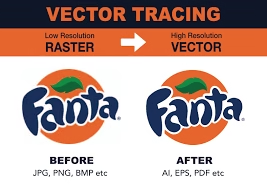
Through this process, raster images are converted into smooth, scalable vector graphics that never lose clarity.
For expert help with image vectorization, visit
Quality Digitizing.
To understand the fundamentals of how vector graphics work, you can explore
Adobe’s guide to vector graphics — a trusted educational resource for designers.
Why Vector Conversion Matters
A low-resolution image may look acceptable on a screen but can lose its sharpness when printed or enlarged.
Vector Conversion ensures that every curve, edge, and detail remains clean no matter how big you scale the image.
Businesses, designers, and printers all rely on vector files to maintain brand consistency across digital and physical formats.
Whether you’re working on a logo, signage, or embroidery design,
Quality Digitizing offers professional
vector conversion services that bring your low-resolution artwork back to life.
How Low-Resolution Images Affect Quality
Low-resolution images are made of pixels. When resized, each pixel stretches, resulting in blurry edges and distorted colors.
Vector graphics, on the other hand, are made of mathematical paths — meaning they can be enlarged infinitely without losing quality.
Low-Resolution Image Vector Conversion transforms those pixel-based files into crisp, editable vector files.
If your artwork or logo looks fuzzy, a professional
vector conversion expert can restore it to a sharp, print-ready design.
The Process of Vector Conversion Explained
The process of Low-Resolution Image Vector Conversion involves several careful steps to ensure accuracy and detail:
1. Image Assessment
Experts evaluate the resolution, color depth, and complexity of the original image. This step determines how much manual work is needed.
2. Tracing and Redrawing
The image is either automatically or manually traced using vector design software. Manual tracing is preferred for precision and professional quality.
3. Refining Shapes and Curves
Every line and curve is smoothed to match the original design perfectly. This ensures that when the vector is scaled, it retains its true shape and proportion.
4. Color Matching and Layering
Colors are adjusted to match the original palette. Vector files can also include layers for advanced printing or embroidery requirements.
5. Exporting the Final File
The final artwork is exported in formats such as AI, EPS, SVG, or PDF. These formats ensure compatibility with printing, engraving, and embroidery machines.
Benefits of Professional Vector Conversion Services
Choosing professional Low-Resolution Image Vector Conversion ensures quality, consistency, and reliability. Here are the main benefits:
- Scalability: Vector graphics can be resized without any loss in clarity.
- Print-Ready Files: Perfect for business cards, banners, and promotional materials.
- Editable Design: Each element can be edited, recolored, or adjusted easily.
- Professional Appeal: Clean, crisp images enhance your brand presentation.
To get professional, high-quality vector results, check out
Quality Digitizing — a trusted name in vector conversion services.
Common Uses of Vectorized Images
Vector images are used across industries — from fashion and printing to digital branding. Some popular applications include:
- Logo and branding material design
- Embroidery and screen printing
- Signage and banner creation
- Engraving and laser cutting
- Digital marketing visuals
Whatever your creative need, Quality Digitizing can help
you transform low-quality graphics into sharp, versatile vector files.
How to Choose the Right Conversion Service
Selecting the right service provider for Low-Resolution Image Vector Conversion ensures you get the best results.
Consider these factors:
- Experience in manual vector drawing
- Turnaround time and pricing transparency
- Portfolio of past work
- Customer reviews and satisfaction rate
For reliable service with proven expertise, visit
Quality Digitizing — known for accuracy, speed, and affordability.
Conclusion
Blurry images and low-resolution files don’t have to limit your creativity.
With professional Low-Resolution Image Vector Conversion, you can bring your artwork back to life in crisp, scalable form.
From business logos to embroidery designs, every detail matters — and the right vector conversion service ensures your image always looks perfect.
Ready to transform your images? Get expert help from
Quality Digitizing today and make your visuals shine.