Table of Contents
- Introduction to Logo Vector Conversion
- What Does “Convert Logo Photo to Vector” Mean?
- Why Convert Logo Photos into Vector Artwork?
- Preparing Your Logo Photo for Vector Conversion
- Step-by-Step Process to Convert Logo Photo to Vector
- Best Software for Vectorizing Logos
- Common Mistakes to Avoid
- Benefits of Professional Vectorization Services
- Expert Tips for Flawless Results
- Conclusion and Call to Action
Introduction to Logo Vector Conversion
Logos represent your brand identity, and their visual clarity matters across every platform. Converting a logo photo into a vector format allows you to reproduce it on business cards, billboards, or fabric without distortion. Raster photos lose sharpness when scaled, while vector graphics maintain perfect lines at any size.
Professional designers and businesses use vectorized logos because they are editable, scalable, and easy to adapt for printing and embroidery. Choosing a reliable digitizing partner like Quality Digitizing ensures precise conversion with no loss in quality.
What Does “Convert Logo Photo to Vector” Mean?
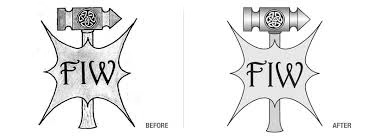
To convert a logo photo to vector means changing a pixel-based image into a mathematical path-based format. Instead of colored pixels, vector graphics use points, lines, and curves to represent shapes. This makes the image scalable and editable without distortion.
Vector formats such as SVG, AI, EPS, and PDF are ideal for printing, embroidery, and high-resolution branding. The process removes background noise, sharpens edges, and reproduces colors precisely as needed for professional use.
Why Convert Logo Photos into Vector Artwork?
Logos captured as photos often suffer from low resolution, uneven lighting, or fuzzy edges. Converting them into vector art offers several benefits:
- Scalable design quality for print and web.
- Editable artwork for future design updates.
- Cleaner, more professional appearance.
- Compatibility with all printers, cutters, and embroidery machines.
- Consistent branding across marketing materials.
By converting your logo to vector format, you future-proof your brand visuals and maintain perfection in every reproduction.
Preparing Your Logo Photo for Vector Conversion
Before you begin, it’s important to prepare the photo for conversion to achieve the best results:
- Use a high-resolution logo photo with good lighting.
- Crop unnecessary background or shadows.
- Adjust brightness and contrast for clearer edges.
- Ensure the logo is centered and properly aligned.
- Save the image in PNG or TIFF format for accuracy.
A clean source image simplifies the vectorization process and results in smoother paths and more accurate shapes.
Step-by-Step Process to Convert Logo Photo to Vector
Follow these simple steps to transform your photo-based logo into clean vector artwork:
- Import the Photo: Open the logo photo in vector software like Adobe Illustrator or CorelDRAW.
- Trace the Image: Use automatic trace tools or manually trace using the pen tool for higher precision.
- Refine Shapes: Adjust curves, remove unnecessary anchor points, and smooth edges.
- Apply Colors: Match colors using brand guidelines or eyedropper tools.
- Clean Background: Remove unwanted areas and keep the logo transparent for printing use.
- Save as Vector Format: Export your final logo as SVG, EPS, or PDF for professional use.
Using this process, your once-blurry logo photo becomes a crisp, infinitely scalable vector image.
Best Software for Vectorizing Logos
While there are many design tools available, these programs offer excellent accuracy and control during the conversion process:
- Adobe Illustrator – the industry standard for vector work.
- CorelDRAW – great for both beginners and professionals.
- Inkscape – a free tool for simple vectorization needs.
However, if you’re not experienced in vector graphics, you can save time and ensure quality by using Quality Digitizing’s professional vectorization service. Their skilled team manually traces and adjusts every detail for perfect print-ready results.
Common Mistakes to Avoid
When converting logo photos to vectors, many beginners make small errors that affect the final quality. Here are a few to watch out for:
- Relying solely on auto-trace tools – they often miss fine details.
- Ignoring alignment and proportion issues.
- Using low-resolution source images.
- Forgetting to simplify paths and remove overlaps.
- Incorrect color calibration between screen and print.
A professional touch ensures your logo conversion looks perfect in every format and medium.
Benefits of Professional Vectorization Services
Hiring professionals to convert logo photo to vector offers multiple advantages:
- Precision tracing for complex or detailed logos.
- Accurate color matching based on branding standards.
- Quick turnaround time for urgent design needs.
- Compatibility with all printers and machines.
- Affordable pricing and consistent results.
With Quality Digitizing, you get reliable, high-quality vector artwork that’s ready for printing, embroidery, or web publishing without errors or pixelation.
Expert Tips for Flawless Results
Follow these expert recommendations to make your converted logos stand out:
- Always work with the highest possible resolution image.
- Use manual tracing for text and fine details.
- Check scaling on different print sizes.
- Use smooth color gradients sparingly.
- Save master files in AI or SVG format for future edits.
Applying these tips ensures long-term usability and professional-grade output.
Conclusion and Call to Action
To summarize, when you convert logo photo to vector, you give your brand the flexibility to appear perfectly on any surface or platform. Clean, scalable artwork represents professionalism, precision, and brand value.
Ready to convert your logo photo into perfect vector artwork? Visit Quality Digitizing today for expert vectorization services that guarantee smooth lines, accurate colors, and print-ready results every time.
For a deeper understanding of vector graphics and their uses, you can read this comprehensive overview of vector graphics that explains their importance in modern digital design.