Table of Contents
- Understanding Low Quality Customer Logos
- Common Problems in Low Resolution Designs
- Why Low Quality Logos Affect Digitizing
- How to Enhance and Prepare Artwork
- Vector Conversion for Logo Restoration
- Digitizing Best Practices
- Tips for Communicating with Clients
- Tools for Improving Image Quality
- Professional Help for Quality Results
- Conclusion
Understanding Low Quality Customer Logos
Many embroidery and printing professionals regularly receive low quality customer logos that are blurry, pixelated, or stretched. These designs are often sourced from screenshots, outdated websites, or low-resolution images found online. Customers usually don’t understand resolution requirements, leaving digitizers responsible for transforming these poor-quality visuals into clean, production-ready artwork.
Before starting any embroidery digitizing, it’s important to evaluate the file quality. Check the pixel dimensions, sharpness, and color consistency. If the image is too distorted or unclear, it’s better to request a higher-quality version or prepare for complete redrawing.
Common Problems in Low Resolution Designs
Low-quality logos create several issues during digitizing and embroidery. Some of the most common problems include:
- Blurry edges: The outlines appear soft, causing the stitches to misalign.
- Distorted text: Small letters or intricate fonts lose definition when scaled.
- Color inconsistency: Faded or incorrect hues make it difficult to match thread colors accurately.
- Missing elements: Fine details, shadows, and gradients often disappear in low-resolution images.
When the original image lacks clarity, your final embroidery will also lack precision. That’s why professionals often redraw or vectorize logos before digitizing. For reliable results, Quality Digitizing offers restoration and digitizing services that ensure the final file meets industry standards.
Why Low Quality Logos Affect Digitizing
Embroidery digitizing depends heavily on accuracy. Each stitch follows a precise path, and even a minor distortion in the source image can lead to uneven results. Low quality customer logos often result in crooked lines, poor text readability, and inconsistent stitch density. This not only affects aesthetics but also increases production time due to multiple corrections.
Additionally, low-resolution files make it difficult to estimate stitch counts or define small elements accurately. This leads to uneven tension, thread breaks, or excessive density in certain areas — all avoidable issues when starting with high-quality artwork.
To learn more about how digital resolution impacts image clarity, you can visit this guide on image resolution, which provides a technical overview of why high-resolution artwork performs better in production.
How to Enhance and Prepare Artwork
Enhancing low quality customer logos involves a combination of digital cleanup and manual redrawing. Start by opening the logo in an editing program such as Adobe Illustrator or CorelDRAW. Adjust brightness, contrast, and color balance to improve visibility. Then, trace the outline of each major shape to rebuild the structure cleanly.
If the logo includes text, identify the closest matching font or recreate it manually using clear reference material. Pay attention to alignment and spacing. Once the logo has been reconstructed, export it as a high-resolution vector file (SVG, PDF, or AI format). These formats prevent distortion when resizing, ensuring consistent embroidery results.
Vector Conversion for Logo Restoration
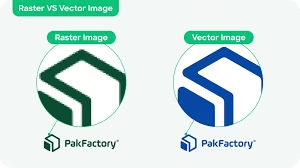
Converting raster images (JPEG, PNG, BMP) to vector graphics is one of the most effective solutions for restoring low quality customer logos. Vector graphics use mathematical paths instead of pixels, allowing them to scale perfectly without losing clarity. This is especially crucial in embroidery digitizing, where accuracy determines the final stitch quality.
Professional services like Quality Digitizing specialize in logo vectorization. They manually trace the design, ensuring smooth curves, clean edges, and proper alignment. Once converted, the vector logo can be digitized for embroidery, screen printing, or other promotional applications without quality loss.
Digitizing Best Practices
When digitizing low quality customer logos, you need to focus on maintaining clarity and balance. Here are some best practices:
- Use simplified stitch patterns for small or intricate details.
- Increase underlay stitches to stabilize delicate areas.
- Adjust density for better coverage on different fabric types.
- Use bold outlines to maintain visibility in small text or thin borders.
- Always test the design with a small sample sew-out before final production.
High-quality digitizing software such as Wilcom or Hatch can assist in improving accuracy, but the digitizer’s expertise is what truly ensures perfection.
Tips for Communicating with Clients
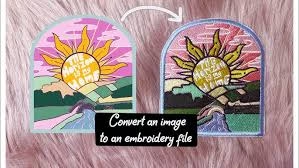
Many clients don’t realize that low quality customer logos are unsuitable for production. Communicating effectively can save both time and effort. Politely explain why the artwork needs to be redrawn or vectorized and provide before-and-after examples if possible. This visual comparison helps clients understand the improvement in clarity and professionalism.
Setting clear expectations early builds trust and prevents revision requests later. Always include details about additional costs or time required for logo restoration in your quote.
Tools for Improving Image Quality
Several modern tools can assist in improving low quality customer logos. Programs like Adobe Photoshop, Illustrator, and CorelDRAW allow for manual tracing, while AI-powered platforms such as Vector Magic and Adobe Firefly can automatically enhance low-resolution files. However, automation can only go so far — manual refinement remains essential for perfect embroidery results.
Using online color reference tools such as Pantone Color Finder can also help match accurate thread tones and maintain brand consistency.
Professional Help for Quality Results
In cases where you receive heavily pixelated or distorted logos, professional digitizing support is the best option. Quality Digitizing provides comprehensive logo restoration and vector conversion services to prepare your designs for embroidery or print. Their expert team ensures that every line, shape, and color is optimized for production quality.
With fast turnaround times and guaranteed precision, you can save hours of manual work while ensuring your client receives a professional-quality logo.
Conclusion
Transforming low quality customer logos into professional, high-quality embroidery designs requires patience, technical skill, and attention to detail. From enhancing the artwork to vector conversion and precise digitizing, each step plays a vital role in achieving perfect results. Educating clients, using the right tools, and partnering with experts can make the process smoother and more efficient.
For professional logo restoration, digitizing, and vector conversion, visit Quality Digitizing today and experience the difference expert craftsmanship makes.
Tags: low quality logos, embroidery digitizing, logo restoration, vector conversion, design enhancement